The most common way to consume data in Power BI is to import it into data model.Data from files and folders can be imported only in Power BI.
First, you can import your data which makes the Power BI data model cache it. This method offers you the greatest flexibility when you model your data because you can use all the available modeling features in Power BI.
Second, you can connect to your data directly in its original resource. This method is known as DirectQuery. With DirectQuery, data is not cached in Power BI. Instead, the original data source is queried every time you interact with Power BI visuals. Not all data resources support DirectQuery.
Importing Data
When you import data, the imported data consumes the disk space and RAM of your development machine. When you pubulish your data to a server, the imported data consumes the disk space and RAM of the server.
One of the advantages of this data connection method is that you can use all the funnctionality of Power BI without restrictions(includes all transformation and DAX functions).
Additionally, you can combine imported data from more than one source in the same data model.
Another advantage of this method is the speed of calculations.
DirectQuery
When you use DirectQuery mode, all data remains in the data source except metadata(includes column and table names, data types and relationship).
If you only use DirectQuery in your data model, the Power BI file size will be negligible.
The main advantage of this method is that you are not limited by the hardware of your development machine or the capacity of the server to which you will publish your report.
Composite Models
A composite model is a data model that combines imported data and DirectQuery or that uses DirectQuery to connect to multiple data sources.
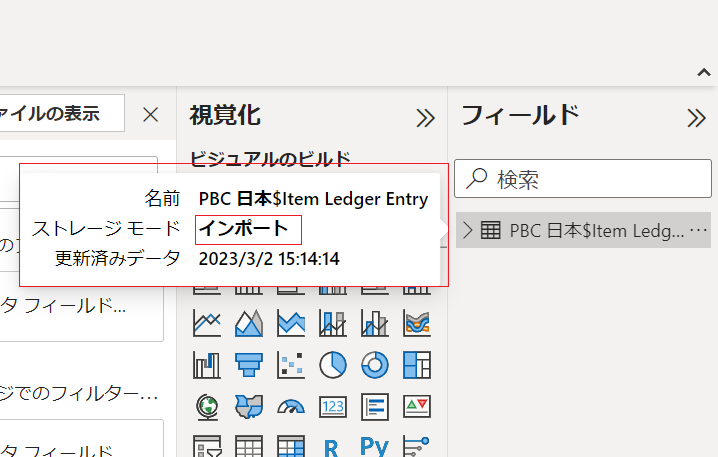
Storage mode can be set to one of the following options:
1.import
2.DirectQuery
3.Dual
The Dual mode means a table is both cached and retrieved in DirectQuery mode when neended, depending on the storage mode of other tables used in the same query.
| Table name | Data Source | Storage Mode |
| Sales | Database | DirectQuery |
| Date | Database | Dual |
| Targets | Excel file | Import |
In this Mode, the Date table is related to both the Sales and the Targets tables. When you use data from the Date and Sales tables, it is retrieved directly from the database in DirectQuery mode; when you use Date and Targets together, no query is sent to the database, which improves the performance of your reports.
Important:
If you change the storage mode from DirectQuery or Dual to import, there is no going back.
コメント